-2.png?width=150&height=20&name=Rhino%20Logo%20(1)-2.png)
Table of Contents
- Introduction
- Before You Start
- Cluster Readiness
- Rhino Configuration Preparation
- Install Rhino
- Access and Enablement
- Operational Hardening
- Upgrades and Recovery
- Troubleshooting and Reference
- Appendix A - Preparing an EKS Cluster for Rhino
- Appendix B - Service Account and IAM Example
- Appendix C - Sample Values Reference
- Appendix D - Single Sign-on OIDC Integration
- Appendix E - Architecture Reference
- Appendix F - Connecting Rhino to Content in S3
- Appendix G - Further Reading
1. Introduction
Purpose
This guide provides end-to-end instructions for deploying Rhino on Amazon Web Services using Amazon Elastic Kubernetes Service.
The guide is intended for AWS Marketplace customers deploying Rhino into their own AWS environments. It covers the minimum decisions required before installation, cluster readiness checks, Rhino configuration preparation, Helm installation, sandbox finalization, production enablement, operational hardening, upgrades, recovery, and troubleshooting.
Audience
This guide is written primarily for customer DevOps, platform engineering, Kubernetes, and AWS infrastructure teams.
Readers are expected to have working familiarity with AWS, Kubernetes, Helm, IAM, DNS, and TLS concepts. Prior Rhino experience is not required.
Supported Deployment Scope
| Cloud Platform | AWS |
| Kubernetes platform | Amazon EKS |
| AI Provider | Amazon Bedrock |
| Authentication | Local authentication or OIDC |
| Storage | EBS-backed persistent volumes |
Example Values Used in This Guide
| AWS Region | us-east-1 |
| EKS Cluster Name | my-eks |
| Kubernetes Namespace | rhino |
| Browser-facing URL | https://rhino.my-company.com |
| Storage Class | gp3-encrypted |
| Service Account | rhino-sa |
| Model Inference Profiles | us.anthropic.claude-sonnet-4-6 us.anthropic.claude-opus-4-8 |
Support
Additional product documentation and support resources are available at https://support.rhino.ai.
For deployment assistance, contact support@rhino.ai.
2. Before You Start
Overview
Before installing Rhino, make only the decisions required to complete a successful initial deployment.
This guide intentionally keeps upfront decisions limited. Many production-oriented choices, such as ingress, TLS, monitoring, backup strategy, and scaling, can be handled after Rhino is installed and reachable.
Prerequisites
Before continuing, ensure:
- You have subscribed to Rhino through AWS Marketplace.
- Amazon Bedrock access is enabled in the target AWS Region.
- You have access to an Amazon EKS cluster or a plan to create one.
- You have kubectl access to the cluster.
- You have Helm installed locally.
AWS Region and Data Residency
Rhino can be deployed entirely within a single AWS Region and does not require a multi-region deployment. Application workloads and persistent application data can remain within the selected region.
When selecting a deployment region, ensure that the AWS services required by your Rhino configuration are available in that region. Service and model availability can vary by region, particularly for services such as Amazon Bedrock.
AWS Services Used by Rhino
The following table summarizes the primary AWS services used in a Rhino deployment. See Appendix E - Architecture Reference for additional detail on the deployment architecture, component relationships, and AWS integrations.
| AWS Service | Role in Rhino Deployment | Requirement / Notes |
| Amazon EKS | Kubernetes environment hosting all Rhino application components | Required |
| Amazon EC2 / VPC Networking | Compute and core networking underlying the EKS cluster, including worker nodes, subnets, routing, and security groups | Required as part of the EKS environment; the specific topology depends on your network architecture. |
| Amazon ECR | Container registry from which EKS retrieves Rhino container images | Required for the documented AWS deployment. Images may be sourced directly from the AWS Marketplace registry or mirrored to an ECR registry you manage within your deployment account and region. |
|
Amazon EBS |
Persistent block storage for stateful Rhino workloads, including containerized PostgreSQL and Redis | Required. Kubernetes persistent volumes backed by EBS provide durable storage for stateful workloads. |
| AWS IAM | Provides AWS permissions to Rhino workloads and supporting infrastructure | Required; workload access to AWS services is configured through IAM roles associates with Kubernetes service accounts using IRSA. |
| Amazon Bedrock | Provides foundation models used by Rhino | Required when Amazon Bedrock is the configured LLM provider; model availability varies by AWS Region |
| Elastic Load Balancing | Provides network access to the Rhino web interface | Deployment-dependent. The documented configuration exposes the Rhino frontend service via an AWS load balancer, but you may choose a different approach based on your existing Kubernetes service and ingress patterns. |
| AWS Certificate Manager (ACM) | Provides TLS certificates when TLS termination is handled by an AWS-managed endpoint | Optional. Used when TLS certificates are managed by AWS as part of your chosen ingress or load-balancer pattern. |
| Amazon Route 53 | Provides DNS for the Rhino endpoint | Optional. Used when DNS for the Rhino endpoint is managed in Route 53; you may instead use your existing DNS provider. |
| Amazon S3 | Provides one method of access to external content by the platform. | Optional. Used only when connecting Rhino to content stored in Amazon S3. See Appendix F for configuration details. |
Do You Already Have an EKS Cluster?
If you already have an EKS cluster, use Section 3 to verify that it is ready for Rhino.
At minimum, the cluster must support:
- IAM Roles for Service Accounts, also known as IRSA.
- Dynamic persistent volume provisioning.
- EBS-backed storage.
- Outbound access to Amazon Bedrock.
- Kubernetes service exposure through either a LoadBalancer service or an ingress controller.
If you do not already have an EKS cluster, consult the Rhino EKS Preparation Guide or AWS EKS documentation, then return to this guide once the cluster is available.
Container Registry
The examples in this guide pull Rhino container images directly from the AWS Marketplace ECR registry. You may instead mirror the images to an ECR registry in your deployment account and region. AWS Marketplace provides instructions for mirroring container images after purchase. If you choose this option, set the Helm configuration option global.imageRegistry to your desired ECR.
Decide which registry EKS will use to pull Rhino images before configuring the deployment.
Browser-Facing URL
Choose the URL that users should e4ventually use to access Rhino.
The examples in this guide use:
rhino.my-company.com
DNS does not need to be configured before installation. However, the Rhino configuration should still use the intended final URL.
For example:
frontend:
  service:
    url: https://rhino.my-company.com
During installation, you may temporarily access Rhino using the AWS-generated LoadBalancer hostname. After installation, configure DNS so users access Rhino using the intended URL.
Authentication Strategy
Decide whether this deployment will use local Rhino authentication or OIDC authentication through an external identity provider.
For sandbox, proof-of-concept, and evaluation deployments, local authentication is typically the simplest option.
For production deployments, OIDC is generally recommended. If OIDC will be used, it is recommended to configure it before onboarding users.
StorageClass Selection
Rhino requires persistent storage for stateful components.
The examples in this guide use: gp3-encrypted
Before installation, confirm that your desired StorageClass exists in your cluster and meets your organization's storage and encryption requirements.
Service Account Selection
Rhino uses a Kubernetes service account to access AWS services through IAM Roles for Service Accounts.
The examples in this guide use:
rhino-sa
This service account should be associated with an IAM role that provides access to required AWS services, including Amazon Bedrock and Rhino licensing operations. Example service account and IAM configuration guidance is provided in Appendix B.
Bedrock Model Configuration
Rhino recommends a multi-model configuration using Claude Sonnet 4.6 and Claude Opus 4.8. The examples in this guide use the following US cross-region inference profiles:
us.anthropic.claude-sonnet-4-6us.anthropic.claude-opus-4-8
Confirm that your selected models and preferred inference profiles are available and enabled for your target AWS Region and meet your regional requirements before installing Rhino.
Continue to Cluster Readiness
Once you have identified your browser-facing URL, authentication strategy, StorageClass, service account, and Amazon Bedrock configuration, continue to Section 3 to verify that your cluster is ready for Rhino.
3. Cluster Readiness
Overview
Before installing Rhino, verify that your Kubernetes environment is ready to support the application.
This guide assumes Rhino will be deployed into Amazon EKS. If you already have an EKS cluster, use this section to verify readiness before proceeding.
This section assumes you already have access to an Amazon EKS cluster. If you do not yet have a cluster, consult the Rhino EKS Preparation Guide or AWS EKS documentation, then return to this guide once the cluster is available.
Verify Cluster Access
Before continuing, confirm that you can successfully access the target cluster using kubectl and Helm.
Example validation:
kubectl get nodes
Successful execution confirms Kubernetes API access and basic cluster connectivity.
IAM Roles for Service Accounts
Rhino uses IAM Roles for Service Accounts to access AWS services securely.
Before continuing, verify:
- An OIDC provider is associated with the EKS cluster.
- IRSA is enabled and operational.
- Kubernetes service accounts can assume AWS IAM roles.
The examples in this guide use the following service account:
rhino-sa
Example service account and IAM configuration guidance is provided in Appendix B.
Persistent Storage
Rhino requires dynamic persistent volume provisioning for stateful components.
Before continuing, verify:
- The Amazon EBS CSI driver is installed.
- PersistentVolumeClaims can be dynamically provisioned.
- The intended StorageClass exists.
This guide uses the following example StorageClass:
gp3-encrypted
Example validation:
kubectl get storageclass
Amazon Bedrock Access
Rhino uses Amazon Bedrock for AI model access.
Before continuing, verify:
- Amazon Bedrock is enabled in the target Region.
- The required models have been approved and enabled.
- The Rhino service account will have permission to invoke Bedrock models.
This guide uses the following model inference profiles:
- us.anthropic.claude-sonnet-4-6
- us.anthropic.claude-opus-4-8
Network Connectivity
Rhino workloads require outbound connectivity to AWS services.
Before continuing, verify that workloads running in the cluster can access:
- Amazon Bedrock
- AWS licensing services
- Amazon ECR
If you are deploying into a restricted networking environment, ensure that the required AWS endpoints are reachable before installation.
Cluster Readiness Checklist
Before proceeding, verify:
- EKS cluster access is working.
- Helm access is available.
- IRSA is enabled and operational.
- The EBS CSI driver is installed.
- The Amazon S3 Mountpoint CSI driver is installed (required to connect Rhino to content in S3; see ).
- Dynamic persistent volume provisioning is working.
- The intended StorageClass is available.
- Amazon Bedrock access is enabled.
- Required Bedrock models are available.
- The Rhino service account strategy has been identified.
Continue to Rhino Configuration Preparation
Once these requirements have been validated, continue to Section 4 to prepare the Rhino namespace, service account configuration, values file, and Amazon Bedrock settings required for installation.
4. Rhino Configuration Preparation
Overview
This section prepares the Rhino-specific configuration required before installation.
At this stage:
- An Amazon EKS cluster is available.
- Cluster readiness requirements have been validated.
- Amazon Bedrock access has been enabled.
- A service account strategy has been selected.
The goal of this section is to create a minimal Rhino configuration that can be used to successfully deploy Rhino and complete initial validation.
For the complete configuration reference, use the latest sample-values.yml file provided separately with this guide or through the Rhino support portal.
Create the Namespace
This guide uses the following Kubernetes namespace:
rhino
Create the namespace if it does not already exist:
kubectl create namespace rhino
If the namespace already exists, this step can be skipped.
Service Account Configuration
This guide uses the following Kubernetes service account:
rhino-sa
The service account should already be associated with the IAM permissions required for Amazon Bedrock access and Rhino licensing operations. See Appendix B for more information.
The Rhino Helm configuration will reference this service account during deployment.
Create rhino-values.yaml
Create a file named:
rhino-values.yaml
The following example represents the minimum recommended configuration required to deploy Rhino on Amazon EKS using Amazon Bedrock.
global:
  storageClass: gp3-encrypted
  # Override to pull Rhino images from an ECR registry you manage.
  # imageRegistry: <account-id>.dkr.ecr.<region>.amazonaws.com

serviceAccount:
  name: rhino-sa

frontend:
  service:
    type: LoadBalancer
    port: 80
    url: https://rhino.my-company.com

ai:
  llmConfig:
    catalog:
      providers:
        - type: bedrock
          name: bedrock-recommended
          client_parameters:
            region_name: us-east-1
          models:
            - model: claude-sonnet-4-6
              proxy_model_name: us.anthropic.claude-sonnet-4-6
              rate_limit:
                per_minute:
                  tokens: 5000000
                  requests: 10000
            - model: claude-opus-4-8
              proxy_model_name: us.anthropic.claude-opus-4-8
              rate_limit:
                per_minute:
                  tokens: 15000000
This example intentionally includes only the settings required for an initial deployment. Additional configuration options are available in the sample-values.yml reference described in Appendix C.
Recommended Bedrock Configuration
Rhino recommends a multi-model Amazon Bedrock configuration consisting of Claude Sonnet 4.6 and Claude Opus 4.8. The example configuration in this guide uses US cross-region inference profiles for these models.
This configuration provides a practical starting point while allowing Rhino to route requests across multiple approved models. You may modify model selection, inference profiles, throughput limits, and regional settings to align with your requirements and Amazon Bedrock quotas.
Frontend URL Strategy
Rhino requires a browser-facing application URL.
This guide uses: rhino.my-company.com
Configure the intended final URL now, even if DNS has not yet been created.
For example:
frontend:
  service:
    url: https://rhino.my-company.com
The configured URL does not need to be reachable during installation. During installation, Rhino may be temporarily accessed using the AWS-generated LoadBalancer hostname.
This is sufficient for installation validation and initial testing. After installation validation, we recommend configuring HTTPS/TLS and DNS so users access Rhino using the intended URL.
LoadBalancer and Ingress Considerations
The examples in this guide use a Kubernetes LoadBalancer service because it simplifies installation and validation.
For production deployments, many organizations choose to expose Rhino through an ingress controller instead. Ingress configuration, DNS integration, and HTTPS/TLS are discussed later in this guide.
Configuration Checklist
Before proceeding, verify:
- The rhino namespace exists or will be created during installation.
- The rhino-sa service account has been prepared.
- Amazon Bedrock access is enabled in the target Region.
- The desired browser-facing URL has been selected.
- The rhino-values.yaml file has been created and reviewed.
Continue to Installation
Once the values file has been prepared, continue to Section 5 to deploy Rhino using Helm.
5. Install Rhino
Overview
This section deploys Rhino into the prepared Amazon EKS environment using Helm.
At this stage:
- An EKS cluster is available and ready.
- The Rhino namespace has been identified.
- The Rhino service account has been prepared.
- Amazon Bedrock access has been enabled.
- The rhino-values.yaml file has been created.
A successful installation results in Rhino workloads running successfully, browser access to the Rhino login page, and successful Rhino license validation.
Install Rhino
Deploy Rhino using Helm and the values file prepared in the previous section. The install command below matches what is shown in the Launch Instructions on the AWS Marketplace page for your Rhino subscription.
Finding your Product ID
Set license.key.value to the Product ID for your purchased subscription. Your Product ID is shown in the Launch Instructions, or you can find it near the top of your subscription page in the AWS Marketplace subscription management console.
helm install rhino oci://709825985650.dkr.ecr.us-east-1.amazonaws.com/rhino-ai/<your-product-name>/helm/rhino \
  --namespace rhino \
  --values rhino-values.yaml \
  --set license.key.value=<your-product-id> \
  --set license.issuerFingerprint.value=aws:294406891311:AWS/Marketplace:issuer-fingerprint
If you copied the Rhino container images from AWS Marketplace to an ECR registry in your deployment account, ensure that global.imageRegistry is configured in your values file before installation.
If you also copied the Helm chart to your ECR registry, use the corresponding OCI chart reference in the install command. Alternatively, if you have downloaded the chart, you can replace the oci:// registry reference with the chart file name, for example rhino-[version].tgz.
Helm should report a successful release installation.
Monitor Startup
After installation, monitor Rhino startup progress.
kubectl get pods -n rhino
During startup, workloads may temporarily appear in states such as Pending, ContainerCreating, Init, or Running.
Allow several minutes for image downloads, volume provisioning, database initialization, and application startup.
Continue monitoring until all Rhino workloads report a healthy Running state.
Validate Services
Verify that Rhino services were created successfully.
kubectl get svc -n rhino
For the Quickstart deployment path, the frontend service should be configured as a Kubernetes LoadBalancer service.
AWS may require several minutes to provision the load balancer and assign an external hostname.
Access Rhino
Once the frontend load balancer has been provisioned, retrieve the assigned hostname and open it in a browser.
Example:
http://[aws-generated-load-balancer-hostname]
You should see the Rhino login page.
At this stage, DNS may not yet be configured, HTTPS/TLS may not yet be configured, and the final browser-facing URL may not yet be active. This is expected for a Quickstart deployment.
The temporary AWS-generated hostname is sufficient for installation validation.
Required Installation Validation
The installation is considered successful when:
- Rhino pods are healthy.
- The frontend LoadBalancer has been provisioned.
- The Rhino login page is accessible from a browser.
For most installations, this level of validation is sufficient.
Additional Validation
If additional validation is desired, review backend logs.
Example:
kubectl logs deployment/rhino-backend -n rhino
Depending on the Rhino version, startup logs may include messages indicating successful license validation, successful Amazon Bedrock connectivity, and successful application initialization.
Reviewing logs is optional but may be useful when validating new environments or troubleshooting startup issues.
After installation, you may also optionally sign in to Rhino and perform additional validation. Examples include opening the About page, confirming version information, confirming AI provider connectivity, and verifying user account visibility.
License Validation
Rhino validates its license entitlement during startup.
In most environments, successful backend startup indicates that license validation completed successfully.
No separate licensing validation procedure is required.
If license validation fails, backend startup will typically fail and corresponding logs should be reviewed.
Installation Complete
The installation is complete when Rhino workloads are healthy, the application is reachable from a browser, and backend startup completed successfully.
At this point, Rhino is installed and ready for initial use.
Continue to Section 6 for sandbox finalization and production enablement options.
6. Access and Enablement
Overview
Rhino is now installed and operational.
For sandbox, proof-of-concept, and evaluation deployments, you may choose to perform a small amount of additional configuration and begin using Rhino.
For shared and production deployments, additional work is typically performed before onboarding users, including DNS configuration, HTTPS/TLS, authentication integration, and ingress planning.
6.1 Sandbox Finalization
The Quickstart installation path uses a Kubernetes LoadBalancer service to simplify deployment and validation.
During installation, you may have accessed Rhino using the AWS-generated LoadBalancer hostname and you may still have port:80 set in your Helm values.
Before broader use, it is recommended to create a DNS record and switch to HTTPS/TLS for the intended Rhino URL and access Rhino using that URL.
Configure DNS and HTTPS/TLS
If you are deploying on an organization-managed cluster, follow your organization's standard processes for configuring DNS and HTTPS/TLS for deployed applications.
If you are deploying in a new EKS cluster, AWS provides multiple approaches for exposing applications with HTTPS, including:
- EKS Auto Mode NLB configuration: https://docs.aws.amazon.com/eks/latest/userguide/auto-configure-nlb.html
- AWS Load Balancer Controller: https://kubernetes-sigs.github.io/aws-load-balancer-controller/
Depending on the selected approach, you may need to modify the Rhino frontend.service configuration (such as type or port), create Ingress resources, configure an ACM certificate, or add AWS load balancer annotations in frontend.service.annotations.
You should now create a DNS record for the Rhino URL selected earlier in this guide. Common approaches include Amazon Route 53 or an existing enterprise DNS platform.
Example: rhino.my-company.com
Point the DNS record to the AWS-generated LoadBalancer hostname created during installation.
After DNS propagation and TLS configuration are complete, you are ready to access Rhino using the configured URL rather than the temporary AWS-generated hostname.
Optional First Login
After DNS and TLS have been configured, you may optionally sign in and perform additional validation.
Suggested validation steps:
- Sign in to Rhino.
- Open the About page.
- Verify Rhino version information.
- Verify AI provider connectivity status.
- Open the Users page.
- Confirm the current user account is visible.
These checks provide additional confidence that the deployment is functioning as expected.
At this point, Rhino is ready for evaluation, proof-of-concept activities, and general sandbox use.
6.2 Production Enablement
Production deployments typically introduce additional infrastructure and operational controls before onboarding users.
DNS and Stable URLs
Production deployments should provide users with a stable browser-facing URL.
The Rhino URL configured during installation should match the URL users access from their browsers.
This guide uses: rhino.my-company.com
HTTPS and TLS
Production deployments should enable HTTPS before onboarding users.
Common approaches include AWS Certificate Manager and existing organizational certificate management processes.
HTTPS provides encrypted browser traffic and aligns with common enterprise security requirements.
Ingress Architecture
The Quickstart deployment uses a Kubernetes LoadBalancer service.
Many production deployments instead expose Rhino through an ingress controller.
Benefits may include centralized traffic management, HTTPS termination, standardized routing, and alignment with existing Kubernetes platform standards.
You ay continue using a LoadBalancer service if it aligns with organizational requirements.
Passwords and Secrets
The Quickstart deployment does not explicitly configure a PostgreSQL database password; instead, the chart automatically generates one and stores it in a Kubernetes Secret.
For production deployments, you should provide the database password through a pre-created Kubernetes Secret or use an external secrets-management system integrated with the cluster. The configuration will then need to adjust to refer to the existing Kubernetes secret.
Authentication Integration
Sandbox deployments commonly use local authentication.
Production deployments frequently integrate Rhino with an external identity provider using OIDC.
Benefits of OIDC include single sign-on, centralized identity management, multi-factor authentication enforcement, and user lifecycle management.
If OIDC will be used, it is recommended to configure OIDC before onboarding users.
User Onboarding
After authentication has been configured and browser access has been finalized, users may begin onboarding to Rhino.
Before onboarding users, consider authentication requirements, URL stability, HTTPS requirements, and organizational access controls.
Continue to Operational Hardening
Once Rhino is accessible using its intended browser-facing URL and authentication requirements have been addressed, continue to Section 7 for operational hardening guidance, including monitoring, backup planning, recovery planning, and scaling considerations.
7. Operational Hardening
Overview
Once Rhino is installed, accessible, and ready for users, consider additional operational practices to support reliability, recovery, and long-term growth.
The topics in this section are not required to complete an initial installation, but they are commonly reviewed before deploying Rhino into production environments.
Monitoring and Logging
Production deployments should incorporate Rhino into existing monitoring and logging processes.
Recommended practices include:
- Monitoring pod health and restart counts.
- Monitoring persistent storage utilization.
- Monitoring Kubernetes node health.
- Collecting and retaining application logs.
- Monitoring load balancer and ingress health.
Organizations with existing observability platforms should integrate Rhino into those operational workflows.
Backup Planning
Production deployments should include a backup strategy for Rhino data.
Backup requirements vary by organization and may depend on recovery objectives, retention requirements, compliance requirements, and existing backup tooling.
Backup procedures should be validated periodically to ensure recovery objectives can be met.
Recovery Planning
In addition to backups, organizations should establish documented recovery procedures.
Recommended planning topics include cluster failure scenarios, storage failure scenarios, regional failure and recovery considerations, recovery testing procedures, operational ownership, and escalation paths.
Recovery procedures should be reviewed and tested periodically.
Amazon Bedrock Capacity Planning
Amazon Bedrock applies service quotas and model-specific limits.
As Rhino adoption grows, monitor request volume, token consumption, model availability, and regional quotas.
Organizations with high-volume workloads may need to request quota increases from AWS.
Scaling Considerations
The default deployment configuration is suitable for many initial deployments.
As usage grows, consider increasing worker capacity, increasing application replica counts, reviewing storage performance requirements, and reviewing cluster sizing requirements.
Additional configuration options are available in the sample-values.yml reference described in Appendix C.
Production Readiness Review
Before onboarding larger user populations, review:
- DNS configuration.
- HTTPS/TLS configuration.
- Authentication integration.
- Monitoring coverage.
- Backup strategy.
- Recovery procedures.
- Amazon Bedrock capacity planning.
Continue to Upgrades and Recovery
Once operational requirements have been reviewed, continue to Section 8 for upgrade planning, version management, and rollback guidance.
8. Upgrades and Recovery
Overview
Rhino releases may include new features, performance improvements, security updates, and platform enhancements.
Before upgrading Rhino, review the applicable release notes and migration documentation to understand any version-specific requirements.
Organizations should also establish a rollback strategy before performing upgrades in production environments.
Upgrade Planning
Before upgrading Rhino:
- Review release notes for the target version.
- Review any applicable migration documentation.
- Verify backup and recovery procedures.
- Schedule an appropriate maintenance window.
- Communicate expected impact to stakeholders.
Organizations with production deployments should validate upgrades in a non-production environment before upgrading production systems.
Upgrade Procedure
The Rhino upgrade process follows the standard Helm upgrade workflow.
Typical upgrade activities include:
- Review release documentation.
- Update the Rhino Helm package.
- Apply any required configuration changes.
- Execute the Helm upgrade.
- Monitor application startup.
- Validate deployment health.
Upgrade procedures may vary depending on the Rhino version being installed and any associated migration requirements.
Always review the release documentation for the target version before performing an upgrade.
Post-Upgrade Validation
After an upgrade completes successfully, verify:
- Rhino workloads are healthy.
- Application startup completed successfully.
- Browser access is functioning.
- Authentication is functioning as expected.
- AI provider connectivity is functioning as expected.
Production environments should also verify normal application usage before concluding the maintenance window.
Rollback Overview
If an upgrade cannot be completed successfully, a rollback may be required.
Rollback procedures should be planned before beginning any production upgrade.
In general, the rollback process consists of:
- Execute the appropriate database rollback procedure or rollback job.
- Redeploy the previous Rhino version.
- Validate application health and functionality.
The exact rollback procedure may vary depending on the Rhino version and the migrations performed during the upgrade.
Always consult the applicable migration documentation before executing a rollback.
Recovery Considerations
In some situations, recovery from backups may be required.
Examples include storage corruption, accidental data deletion, infrastructure failures, and recovery testing exercises.
Backup restoration procedures should be documented, tested, and aligned with organizational recovery objectives.
Migration Documentation
Some Rhino releases include migration requirements that must be completed during upgrade or rollback operations.
Before performing version changes, review all applicable migration documentation for the source and target versions.
Migration documentation may include required configuration changes, database migration requirements, rollback considerations, and version-specific operational guidance.
Continue to Troubleshooting and Reference
For common installation, startup, connectivity, storage, authentication, and operational issues, continue to Section 9.
9. Troubleshooting and Reference
Overview
This section provides guidance for diagnosing common installation and operational issues.
For additional support resources, visit https://support.rhino.ai.
Rhino Pods Do Not Become Healthy
If Rhino workloads remain in Pending, Init, CrashLoopBackOff, or other non-running states, begin by reviewing pod status and events.
kubectl get pods -n rhino
kubectl describe pod [pod-name] -n rhino
Common causes include:
- Storage provisioning issues.
- Service account configuration issues.
- IAM permission issues.
- Image pull failures.
- Kubernetes resource constraints.
Review Kubernetes events and pod logs to identify the underlying cause.
Persistent Volume Claims Remain Pending
Rhino requires persistent storage for stateful components.
If workloads remain pending due to storage issues, review PersistentVolumeClaim status.
kubectl get pvc -n rhino
Common causes include missing StorageClass, incorrect StorageClass configuration, Amazon EBS CSI driver issues, or storage provisioning restrictions.
Verify that the intended StorageClass exists and supports dynamic volume provisioning.
LoadBalancer Is Not Provisioned
The Quickstart deployment uses a Kubernetes LoadBalancer service.
Verify service status:
kubectl get svc -n rhino
AWS load balancer creation may require several minutes.
If an external hostname is not assigned, review service events, Kubernetes events, AWS load balancer provisioning status, and cluster networking configuration.
Browser Access Issues
If Rhino cannot be reached from a browser, verify:
- Rhino pods are healthy.
- The frontend service is available.
- The LoadBalancer hostname is reachable.
- DNS records are configured correctly.
If DNS has not yet been configured, access Rhino using the AWS-generated LoadBalancer hostname.
DNS Issues
If Rhino is reachable using the LoadBalancer hostname but not the intended URL, verify:
- DNS record configuration.
- DNS propagation status.
- Browser access to the configured hostname.
- The configured frontend.service.url value.
DNS propagation delays may occur depending on the DNS provider and record configuration.
Amazon Bedrock Connectivity Issues
If AI functionality is unavailable, verify:
- Amazon Bedrock is enabled in the target Region.
- Required models have been approved and enabled.
- The Rhino service account has Bedrock permissions.
- Network connectivity to AWS services is available.
Review backend logs for Bedrock-related connectivity or authorization errors.
Authentication Issues
If users cannot authenticate, verify:
- Authentication configuration.
- OIDC configuration, if applicable.
- Identity provider connectivity.
- User account configuration.
For OIDC deployments, review both Rhino configuration and identity provider settings.
Upgrade Issues
If an upgrade does not complete successfully:
- Review upgrade logs.
- Review migration documentation.
- Validate application startup.
- Review rollback requirements before taking corrective action.
Do not execute rollback procedures without reviewing the applicable migration documentation.
Collecting Diagnostic Information
Before contacting support, collect:
kubectl get pods -n rhino
kubectl get svc -n rhino
kubectl get pvc -n rhino
kubectl describe pod [pod-name] -n rhino
Relevant application logs may also be requested.
Providing this information with the initial support request can significantly reduce troubleshooting time.
Support Resources
For additional assistance, visit https://support.rhino.ai.
When contacting support, include:
- Rhino version.
- Kubernetes version.
- Amazon EKS version.
- Relevant error messages.
- Diagnostic information collected during troubleshooting.
Email support at support@rhino.ai.
Appendix A - Preparing an EKS Cluster for Rhino
Overview
If you do not already have an Amazon EKS cluster, create one using your organization’s standard AWS provisioning process or the AWS EKS documentation.
This appendix summarizes the cluster capabilities Rhino requires. It is not intended to replace AWS EKS setup documentation.
Network Foundation
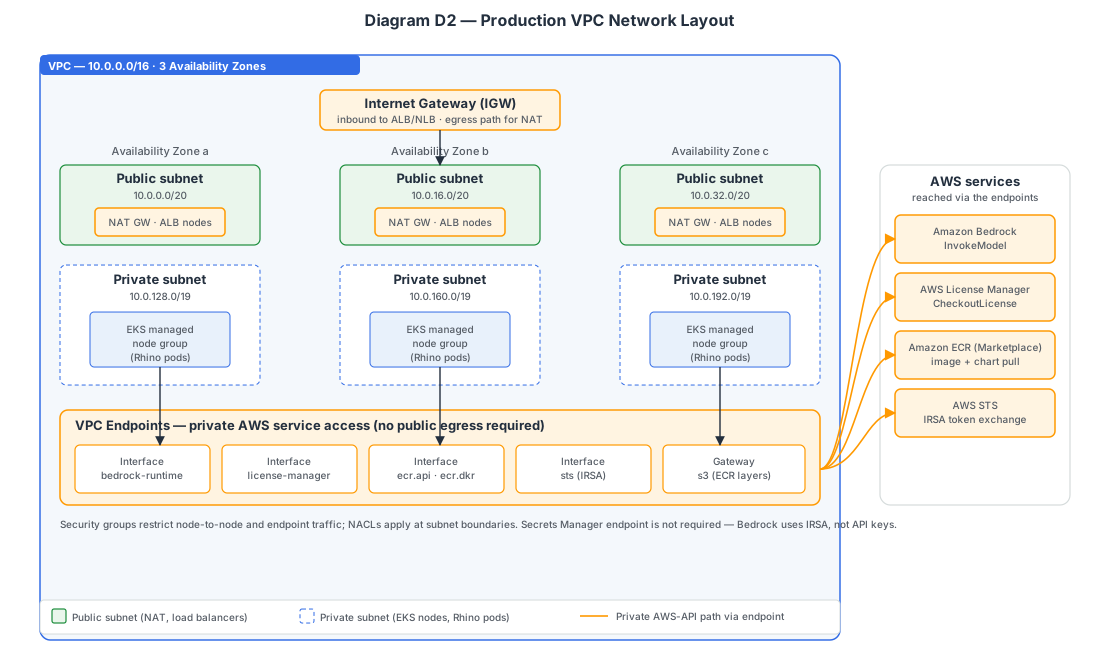
A production EKS cluster commonly uses a multi-AZ VPC with private subnets for worker nodes and public subnets for load balancers and NAT gateways.
Customers with restricted egress requirements should consider VPC endpoints for AWS services Rhino needs to reach, including Amazon Bedrock, Amazon ECR, AWS STS, and AWS licensing services.
IRSA Trust Chain
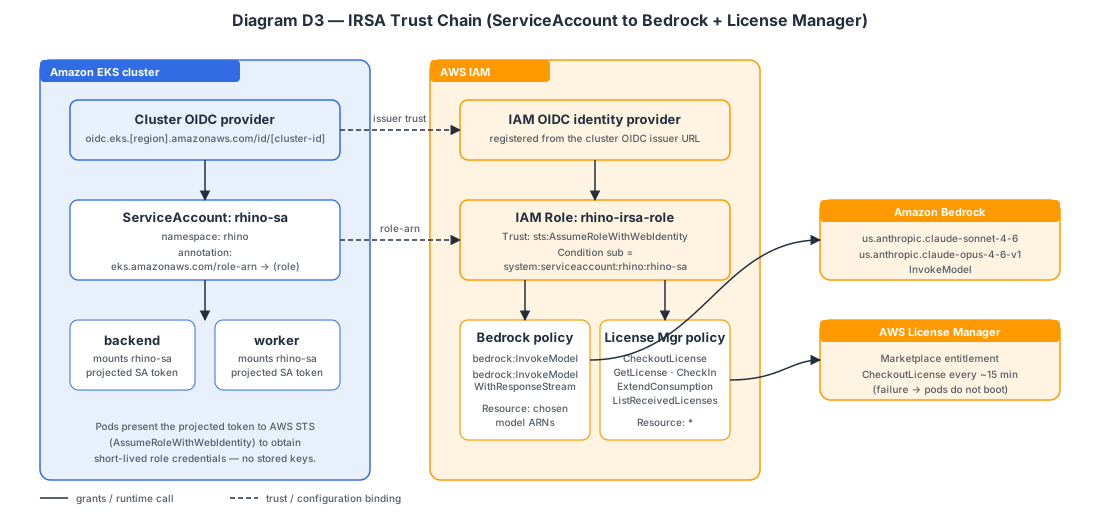
Rhino uses IAM Roles for Service Accounts so Kubernetes workloads can assume AWS IAM roles without storing static AWS credentials in the cluster.
The Rhino service account should be associated with IAM permissions for Amazon Bedrock access and Rhino licensing operations.
Required Cluster Capabilities
The EKS cluster should support:
- Linux amd64 worker nodes.
- kubectl access for deployment operators.
- Helm access for deployment operators.
- IAM Roles for Service Accounts, also known as IRSA.
- Amazon EBS CSI driver.
- Amazon S3 Mountpoint CSI driver. (Required to connect Rhino to content in S3; see Appendix F.)
- Dynamic PersistentVolume provisioning.
- Outbound access to Amazon Bedrock.
- Outbound access to Amazon ECR.
- Outbound access to AWS licensing services used by Rhino.
Recommended StorageClass
The examples in this guide use the following StorageClass: gp3-encrypted
Production deployments should use a StorageClass that satisfies your organization’s encryption, retention, and storage performance requirements.
Recommended Service Account
The examples in this guide use the following Kubernetes service account: rhino-sa
This service account should be associated with an IAM role that allows Rhino workloads to access required AWS services, including Amazon Bedrock and Rhino licensing operations.
Cluster Validation Commands
After the cluster is created, validate basic access:
kubectl get nodes
Validate available StorageClasses:
kubectl get storageclass
Review cluster workloads and add-ons:
kubectl get pods -A
Before Returning to the Installation Guide
Before continuing with Rhino installation, confirm:
- The EKS cluster is reachable with kubectl.
- Helm can communicate with the cluster.
- IRSA is enabled and operational.
- The Amazon EBS CSI driver is installed.
- The intended StorageClass exists.
- Amazon Bedrock access is enabled in the target Region.
- The required Bedrock models are available.
- The Rhino service account and IAM role strategy has been identified.
After these requirements are satisfied, return to Section 3 to confirm cluster readiness and continue the Rhino installation workflow.
Appendix B - Service Account and IAM Example
Overview
Rhino uses IAM Roles for Service Accounts to access AWS services without requiring long-lived AWS credentials inside containers.
This appendix provides an example service account configuration. Adjust names, IAM roles, and permissions to align with organizational standards.
IAM Permissions
The IAM role associated with the Rhino service account should provide access to:
- Amazon Bedrock model invocation.
- Rhino licensing operations.
- To connect Rhino to content in S3, also add
s3:ListBucketands3:GetObjectpermissions for the target bucket. See Appendix F. - Any additional AWS services required by your organization.
Refer to AWS IAM, Amazon Bedrock, and AWS Marketplace documentation when creating production IAM policies.
Example Service Account
You have two options for the ServiceAccount object. With either option, you create and manage the IAM role yourself. You create the IAM role and its IRSA trust policy, that trust policy must reference your EKS cluster's OIDC provider, and you supply the role ARN.
If you launched through the AWS Marketplace flow, the launch configuration provides the ServiceAccount name into your Helm values (serviceAccount.name). Both options below are compatible with this approach. Alternatively, you can set name explicitly to the same value.
Option A - Create the ServiceAccount yourself (with kubectl)
Create the ServiceAccount yourself and have the chart reference it by name.
First, apply the standalone manifest:apiVersion: v1
kind: ServiceAccount
metadata:
name: rhino-sa
namespace: rhino
annotations:
eks.amazonaws.com/role-arn: arn:aws:iam::[account-id]:role/[rhino-role]
Second, reference the SA in your rhino-values.yaml (the chart will not try to create it):
serviceAccount:
  create: false    # this is the default
  name: rhino-sa   # usually provided/templated by Marketplace launch
Option B - Let the chart create the ServiceAccount
Let the Helm chart create the ServiceAccount during helm install/upgrade. You do not run kubectl apply for the ServiceAccount in this option - set everything in rhino-values.yaml:
serviceAccount:
  create: true
  name: rhino-sa
  annotations:
    eks.amazonaws.com/role-arn: arn:aws:iam::[account-id]:role/[rhino-role]
The chart renders a ServiceAccount named rhino-sa in the release namespace, carrying the IRSA role-arn annotation. You can set name to any value, or rely on the name the Marketplace launch uses.
Validation
After deployment, verify:
- The Rhino service account exists.
- The expected IAM role is associated with the service account.
- Rhino workloads can access Amazon Bedrock.
- Rhino startup completes successfully.
Appendix C - Sample Values Reference
This guide uses a minimal Rhino configuration example to simplify installation and validation.
For advanced configuration options, you may consult the latest sample-values.yml file available through the Rhino support portal.
The sample-values.yml file includes examples for:
- Scaling and replica counts.
- Storage configuration.
- Authentication configuration.
- Networking and ingress options.
- Resource requests and limits.
- Advanced AI configuration.
- Additional platform-specific settings.
Use sample-values.yml as a configuration reference when customizing Rhino deployments beyond the examples shown in this guide.
Appendix D - Single Sign-on OIDC Integration
Rhino supports integration with external identity providers (IdPs) using OpenID Connect (OIDC). If you are configuring Rhino for external (OIDC) authentication, follow the steps below.
OIDC must be configured at install time. Retroactive integration after configuring user logins is not supported.
Configure an OIDC client in your IdP for Rhino use
Rhino currently operates like a “web app” configuration for OAuth flow.
Rhino currently supports implicit grant with access and refresh tokens.
Obtain configuration values for the app client
- Obtain Client ID and Client secret
- Locate the issuer URL, typically ends in
/oauth2or similar - Configure your OIDC provider to accept the Rhino “authorize” endpoint URL, sometimes called a “callback” or “redirect” URL. The resulting authorize endpoint should have the form
https://rhino.mycompany.com/api/authorize - Ensure your IdP can be configured for “refresh tokens” or “offline access.” Some IdP require specific additional configurations, such as:
- Additional scopes needed
- Additional query parameters that need to be added to the “authorize” URL
Field names may differ based on your IdP. Confirm claim names and issuer URL format in your IdP’s documentation.
Configure Helm Values
Edit your Helm values file to add aglobal.oauth tree. See notional Helm values below for more details. Specific configurations for some common Identity Providers are suggested below.
- Okta/Auth0
- User ID claim should be
email - Additional scopes should be set to
offline_access
- User ID claim should be
- Amazon Cognito
- User ID claim should be
username
- User ID claim should be
- Azure AD
- Locate or create a Client for your App Registration/Tenant. When viewing the Certificates & Secrets, the Client ID is found in the “Secret ID” field and the Client Secret is found in the “Value” field.
- User ID claim should be
unique_name
global:
  oauth:
    ### Required
    issuerUrl: "https://my-idp.com/oauth2"
    userIdClaim: email # enter the desired claim to be used for user IDs, example: email
    existingSecret: existing-secret-name # secret containing client ID/secret keys for the client app
    secretKeys:
      clientId: the-key-holding-client-id
      clientSecret: the-key-holding-client-secret
    ### Optional config, depends on IdP
    # For your IdP, you may want to check the documentation for how to properly enable/configure for "refresh tokens" or "offline access"
    additionalScopes: "offline_access" # often required by many IdP for refresh tokens, comma-separated values in single string
    urlParameters: # key/value pairs for query parameters to include in the authorize URL, if required by IdP
      example_key: "example-value" # for example, this would be included in the authorize URL call to IdP as:  &example_key=example-value
    audience: "" # we are not aware of this being required by any IdP as of July 2025

### Must set this value properly for OAuth callback handling
frontend:
  service:
    url: "https://rhino.my-company.com" # set to the base URL to reach Rhino app from browser
Appendix E - Architecture Reference
Overview
This appendix provides a high-level overview of the Rhino deployment architecture on AWS.
Rhino is deployed entirely within a customer-owned AWS account and Kubernetes environment. Rhino does not require a Rhino-hosted control plane, does not depend on any Rhino-managed infrastructure, and does not require static AWS credentials to be stored within the cluster.
Rhino on AWS Deployment Topology
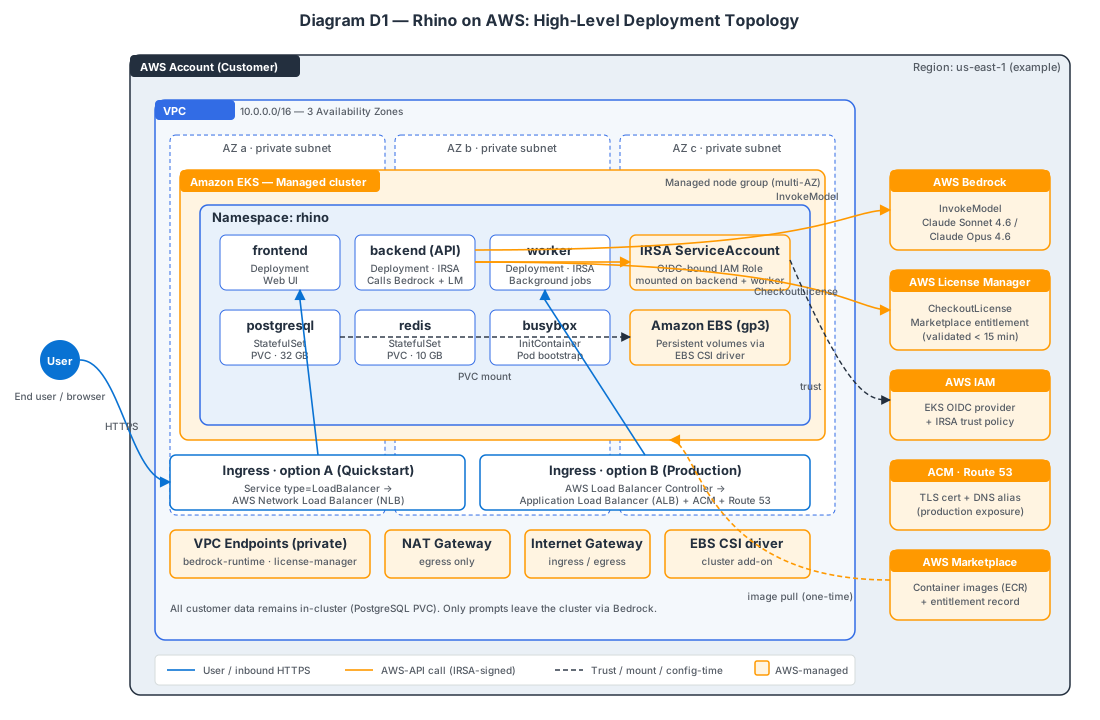
The Rhino on AWS deployment topology illustrates the major AWS services and infrastructure components involved in a typical deployment.
A standard deployment consists of:
- An Amazon EKS cluster running Rhino workloads.
- Persistent storage backed by Amazon EBS volumes.
- Amazon Bedrock for large language model inference.
- AWS License Manager for runtime license validation.
- Kubernetes service exposure through either a LoadBalancer service or an ingress controller.
- IAM Roles for Service Accounts (IRSA) for AWS authentication.
Rhino is deployed entirely within the customer's AWS account. No customer application data is stored within Rhino-managed infrastructure.
Rhino Component Relationships
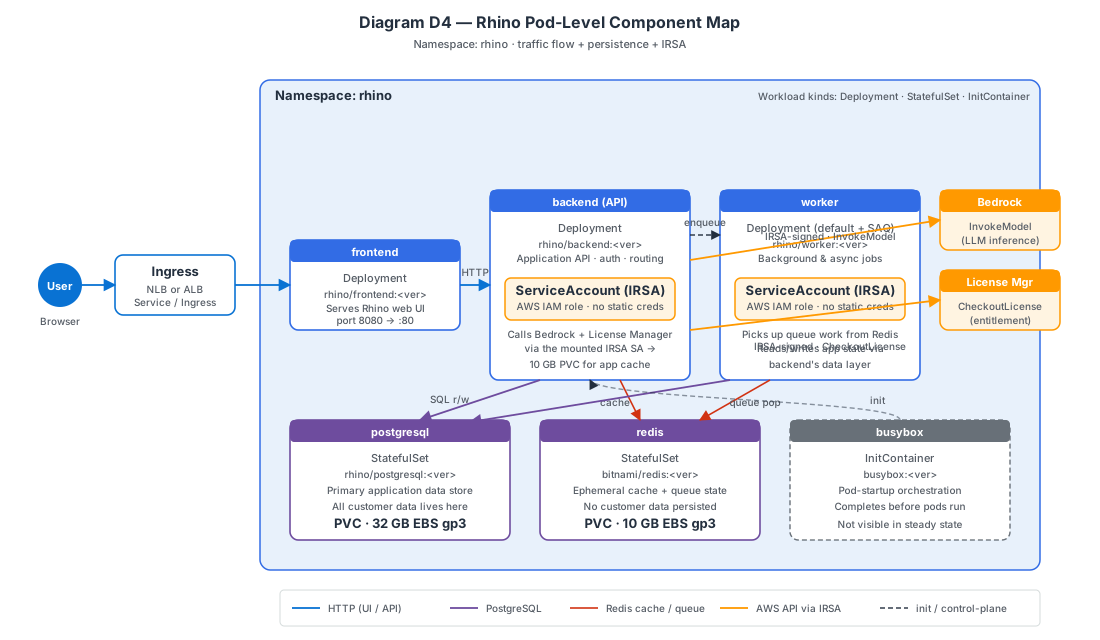
A Rhino deployment consists of several Kubernetes workloads that cooperate to provide application functionality.
Frontend
Provides browser access to the Rhino user interface.
Backend
Provides application APIs, authentication services, orchestration, and integration with AWS services.
The backend is responsible for:
- Amazon Bedrock communication.
- License validation.
- Application workflows.
- User management.
- System administration functions.
Workers
Execute asynchronous processing and background tasks.
Worker workloads handle operations that do not need to be completed during a user request and allow Rhino to process larger workloads efficiently.
PostgreSQL
Stores Rhino application data and configuration.
PostgreSQL represents the primary persistent data store for the platform.
Redis
Provides caching, coordination, and transient application state.
Redis is used to support application performance and background processing workflows.
AWS Integrations
Amazon EKS
Amazon EKS hosts all Rhino workloads and provides the Kubernetes platform used for deployment and operations.
Amazon EBS
Amazon EBS provides persistent storage for stateful Rhino components.
Persistent volumes are dynamically provisioned through the Amazon EBS CSI driver.
Amazon Bedrock
Amazon Bedrock provides access to large language models used by Rhino.
Rhino communicates directly with Amazon Bedrock using IAM-based authentication through IRSA.
No static AWS credentials are stored within Rhino containers.
AWS License Manager
Rhino validates licensing during application startup using AWS licensing services associated with the customer's AWS Marketplace subscription.
License validation occurs automatically during deployment and startup.
Data and Request Flow
A typical request follows this sequence:
- A user accesses Rhino through the frontend.
- The frontend sends application requests to backend services.
- The backend coordinates application workflows.
- The backend and worker services access PostgreSQL for persistent application data.
- The backend and worker services access Redis for caching and coordination.
- When AI functionality is required, Rhino sends requests to Amazon Bedrock.
- During startup, Rhino performs license validation using AWS licensing services.
Authentication and Security
Rhino uses IAM Roles for Service Accounts (IRSA) to authenticate to AWS services.
This approach provides:
- Temporary AWS credentials.
- IAM-managed permissions.
- Credential rotation managed by AWS.
- No static AWS access keys stored in Kubernetes.
The Rhino backend and worker workloads use the configured Kubernetes service account to obtain AWS permissions required for Bedrock access and license validation.
Network Exposure
The examples in this guide expose Rhino using a Kubernetes LoadBalancer service.
For production deployments, organizations may alternatively expose Rhino through an ingress controller integrated with:
- AWS Application Load Balancer.
- AWS Certificate Manager.
- Route 53.
- Existing enterprise networking standards.
The deployment model can be adapted to align with organizational networking, security, and traffic-management requirements.
Appendix F - Connecting Rhino to Content in S3
Overview
Rhino can load plugin content, such as Knowledge Reserve documents, from an S3 bucket mounted as a read-only directory. This allows you to manage content outside the application and have Rhino sync it automatically on startup.
Prerequisites
-
The Amazon S3 Mountpoint CSI driver addon is installed on your EKS cluster.
-
An S3 bucket exists containing your content, following the directory structure above.
- The Rhino service account has S3 read access to the target bucket.
Install the CSI Driver
aws eks create-addon \
  --cluster-name my-eks \
  --addon-name aws-mountpoint-s3-csi-driver \
  --resolve-conflicts OVERWRITE
S3 Bucket Setup
We recommend enabling versioning on your content bucket for rollback capability and audit trail:
aws s3api put-bucket-versioning \
  --bucket my-content-bucket \
  --versioning-configuration Status=Enabled
IAM Permissions
Add S3 read access to the IAM role associated with your Rhino service account:
{
  "Version": "2012-10-17",
  "Statement": [
    {
      "Effect": "Allow",
      "Action": ["s3:ListBucket"],
      "Resource": ["arn:aws:s3:::my-content-bucket"]
    },
    {
      "Effect": "Allow",
      "Action": ["s3:GetObject"],
      "Resource": ["arn:aws:s3:::my-content-bucket/*"]
    }
  ]
}
Helm Configuration
Add to your Rhino values file:
plugins:
  s3:
    bucketName: my-content-bucket
    prefix: production/plugins   # optional, scopes to a path within the bucket
    region: us-east-1
Appendix G - Further Reading
AWS Documentation
- Amazon EKS documentation
- IAM Roles for Service Accounts
- Amazon Bedrock documentation
- Creating a Storage Class in EKS
- Amazon EBS CSI Driver for EKS